 A couple of weeks ago a couple of my colleagues and I came to the conclusion that a client’s Microsoft Exchange platform was in need of some load-balancing.
Normally we achieve this by installing a pair of hardware load-balancers from F5. Whilst these are excellent products and are well supported in our company, they’re certainly not cheap. Unfortunately, one size definitely does not fit all with our customers. Some demand the performance of the Bugatti Veyron, others only require the reliability of a Toyota Corolla.
With that in mind we decided to look at other options.
I’ve been load-balancing Exchange and VMware View for a while here in the lab using keepalived and HAProxy. However, with our company looking at making the move to Softlayer, it was suggested this would be a good time to look at a product they support – nginx+.
Before I can get to that, I need to install and configure keepalived to support my nginx+ installation.
Other articles in the series:
- Installing and configuring keepalived
- Installing nginx+
- Configuring nginx+ for Microsoft Exchange
- Configuring Microsoft Exchange
- Tidying up
Firstly I spun-up two RHEL 6.6 VMs in my lab. These consisted of 1 vCPU, 1Gb of RAM and a 16Gb thin-provisioned disk. They were then patched using Spacewalk.
The IP addresses for both boxes were set to 172.17.80.11/24 and 172.17.80.12/24 and each vmnic was placed in VLAN80.
Then for both boxes, I added the following lines to /etc/sysctl.conf:
net.ipv4.ip_nonlocal_bind=1
net.ipv4.ip_forward=1
And made them take effect:
sysctl -p
Next I acquired the RPM for keepalived. At the time of writing, v1.2.17 is the latest version available. You can download a source tarball from the keepalived site, but for the sake of ease I decided to get the RPM from rpmfind.net. Unfortunately the latest they have for RHEL/CentOS6 is 1.2.13, which for the lab is close enough.
Please note: for deploying in a production environment I would highly recommend obtaining the latest version direct from Red Hat’s Enterprise Load Balancer add-on.
Next I installed keepalived on both boxes:
yum localinstall -y --nogpgcheck keepalived-1.2.13-4.el6.x86_64.rpm
I then copied the default config (just in case):
cd /etc/keepalived
cp keepalived.conf keepalived.conf.old
Next I edited /etc/keepalived/keepalived.conf on the first host (HA1) and added:
! Configuration File for keepalived

global_defs {
   notification_email {
     admin@mdb-lab.com
   }
   notification_email_from keepalived@mdb-lab.com
   smtp_server 172.17.80.31
   smtp_connect_timeout 30
   router_id LVS_DEVEL
}

vrrp_sync_group VG1 {
   group {
      V1
      V2
   }
}

vrrp_instance V1 {
    state MASTER
    interface eth0
    virtual_router_id 10
    priority 101
    advert_int 1
    virtual_ipaddress {
        172.17.80.13
    }

vrrp_instance V2 {
    state MASTER
    interface eth0
    virtual_router_id 11
    priority 101
    advert_int 1
    virtual_ipaddress {
        172.17.80.113
    }
}
The config for HA2 is nearly identical, except for two lines. The state should be BACKUP and the priority should be lower at 100:
! Configuration File for keepalived

global_defs {
   notification_email {
     admin@mdb-lab.com
   }
   notification_email_from keepalived@mdb-lab.com
   smtp_server 172.17.80.31
   smtp_connect_timeout 30
   router_id LVS_DEVEL
}

vrrp_sync_group VG1 {
   group {
      V1
      V2
   }
}

vrrp_instance V1 {
    state BACKUP
    interface eth0
    virtual_router_id 10
    priority 100
    advert_int 1
    virtual_ipaddress {
        172.17.80.13
    }

vrrp_instance V2 {
    state BACKUP
    interface eth0
    virtual_router_id 11
    priority 100
    advert_int 1
    virtual_ipaddress {
        172.17.80.113
    }
}
Next, I configured iptables to allow VRRP communication:
iptables -I INPUT -p 112 -j ACCEPT
I also added a few other lines to iptables allow stuff like ICMP etc.
Finally I enabled the service on both VMs and rebooted:
chkconfig keepalived on
reboot
After I rebooted the hosts I checked to see which had the cluster addresses of 172.17.80.13 and 172.17.80.113:
ip addr sh
On HA1 this gave me:
1: lo: <LOOPBACK,UP,LOWER_UP> mtu 65536 qdisc noqueue state UNKNOWN
    link/loopback 00:00:00:00:00:00 brd 00:00:00:00:00:00
    inet 127.0.0.1/8 scope host lo
    inet6 ::1/128 scope host
       valid_lft forever preferred_lft forever
2: eth0: <BROADCAST,MULTICAST,UP,LOWER_UP> mtu 1500 qdisc pfifo_fast state UP qlen 1000
    link/ether 00:50:56:b2:44:ac brd ff:ff:ff:ff:ff:ff
    inet 172.17.80.11/24 brd 172.17.80.255 scope global eth0
    inet 172.17.80.13/32 scope global eth0
    inet 172.17.80.113/32 scope global eth0
    inet6 fe80::250:56ff:feb2:44ac/64 scope link
       valid_lft forever preferred_lft forever
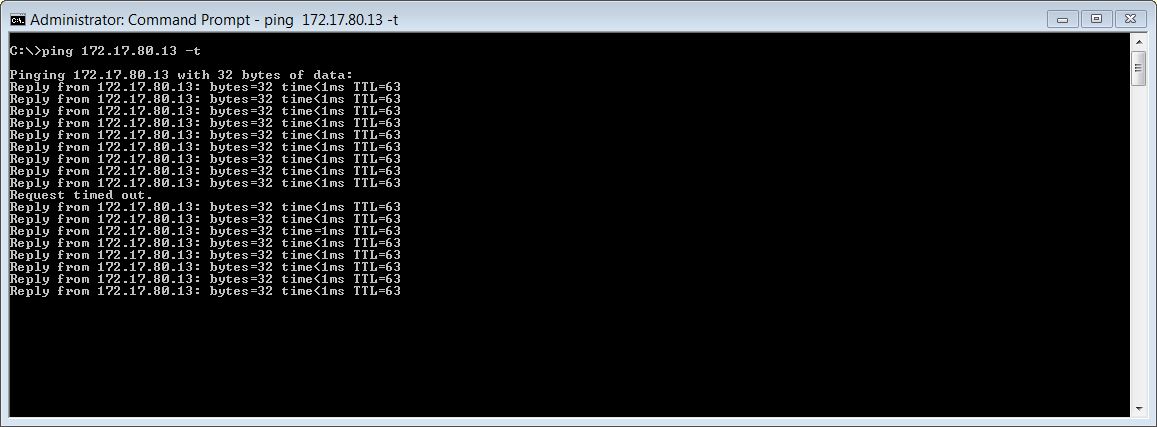
To test failover, I setup a looping ping from another host on VLAN80 to each cluster address and then suspended the HA1 VM. Each cluster IP failed over immediately to HA2, dropping only one ping in the process:
And that completes the keepalived installation and configuration.
In part 2, I install nginx+ on both VMs, before finally configuring it for Microsoft Exchange.
 virtualhobbit
keepalived and HAProxy can load balancing for skype for business ?
LikeLike
Yes I don’t see why not.
LikeLike
if my os is CentOS 6.8 !
To test failover, I setup a looping ping from another host on VLAN80 to each cluster address and then suspended the HA1 VM. Each cluster IP don’t failed over immediately to HA2,
LikeLike